Like any game, Danganronpa has its fair share of bugs. Some more obscure than others, some more game-breaking than others. On this page, we'll delve into all the glitches and oversights discovered in the Danganronpa games, along with how to perform them, and videos showcasing each bug!
GLITCHES & OVERSIGHTS
At this point, Danganronpa has been ported to every console one could dream of. However, what you may not know is that there are many differences or oversights localized to only specific ports, despite being fundamentally the same game. An odd little difference in the PS4 version may exist nowhere else.
You may wonder what the difference between a glitch and an oversight is. By our definition, while both are events unintended by the developer, glitches need to have specific actions committed in order to appear, and can be avoided through an entire natural playthrough, while oversights have a 100% rate of showing up no matter what.
UNDERSTANDING PORTS
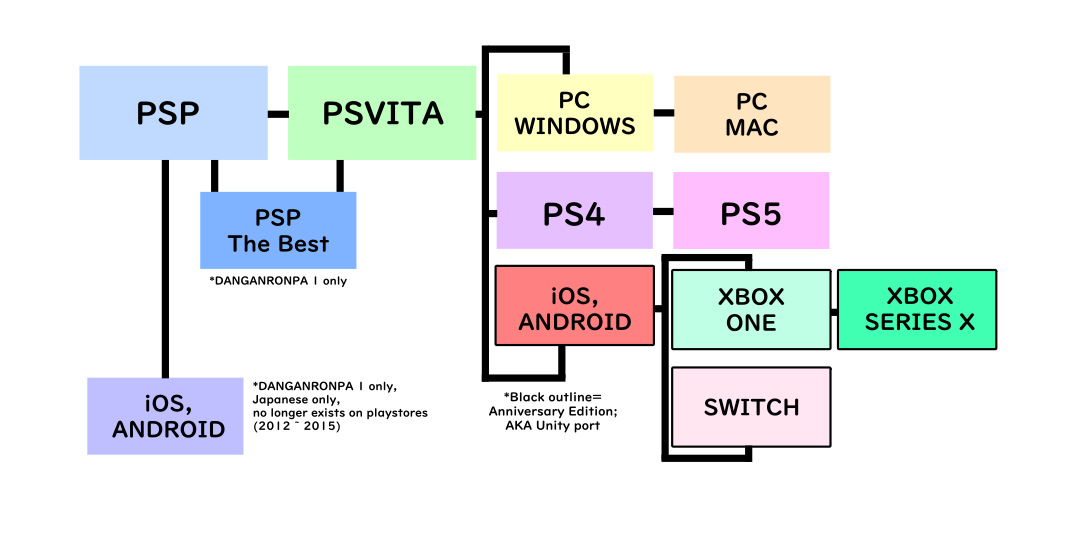
Since we are focusing on version-specific glitches and oversights, we must understand what makes these version different to begin with. As to not waste your time, I'll keep it simple.
Both DR1 and SDR2 were released on PSP in Japan. These versions never saw international release. They later got remakes for the PSVita. I classify the PSVita version as a "remake" rather than "port" in the sense that there is just enough differences in visuals and code that I believe it applies. They are, fundementally, the same game, but with added/removed features, fixed graphics, and fixed errors from the originals. The PSVITA version is what became the base for the international releases and, subsequently, every port.
But, ports aren't just a drag-and-drop, and so assets can be re-exported wrong or certain code that functioned as intended on PSVita version suddenly flops on the PS5. Things like the lighting engine, for example, were tied directly to the PSVita's hardware. We also have to keep in mind that these ports are usually done by a third-party, like Abstraction Games (for the PC version).
Then, there's the Anniversary edition, which is the games remade in the Unity engine. These would be all the mobile releases, Switch, and Xbox. Since it's all running in Unity, these versions are likely to be the most similar to one another, but I err on the side of caution, so I will be listing them all individually.
Here's a simple chart illustration.
BEFORE YOU READ
Some bugs are more harmful than others, and some bugs only occur on specific game ports. An oversight/glitch that is present on the Japanese PSVITA version may not be present on the English PS4 release, for example. Please consult this key:
| × | this glitch/oversight does NOT occur on this version |
| ● | this glitch/oversight DOES occur on this version |
| ? | has NOT been tested yet; inconclusive. Help Danganbase out by providing your own research to fix this! |
| Version does not exist. Because of how cross charts work, there will be overlaps like "ENGLISH PSP" which...is not a real release. |
HARM LEVEL
None - this glitch does not impact gameplay meaningfully whatsoever.
Medium - this glitch does not harm save data, but may crash the game or force the player to reload to an earlier save.
High - this glitch may harm your save data.

Double Komaeda
| PSP | PSVITA (and onwards) |
|---|---|
 |
 |
| JAPANESE | ENGLISH | CHINESE | |
|---|---|---|---|
| PSP | ● | ||
| PSP THE BEST | |||
| PSVITA | × | × | × |
| PS4 | × | × | × |
| PS5 | × | × | × |
| PC WINDOWS | × | × | × |
| PC MAC | × | × | × |
| ANDROID | × | × | × |
| iOS | × | × | × |
| SWITCH | × | × | × |
| XBOX ONE | × | × | × |
| XBOX SERIES X | × | × | × |
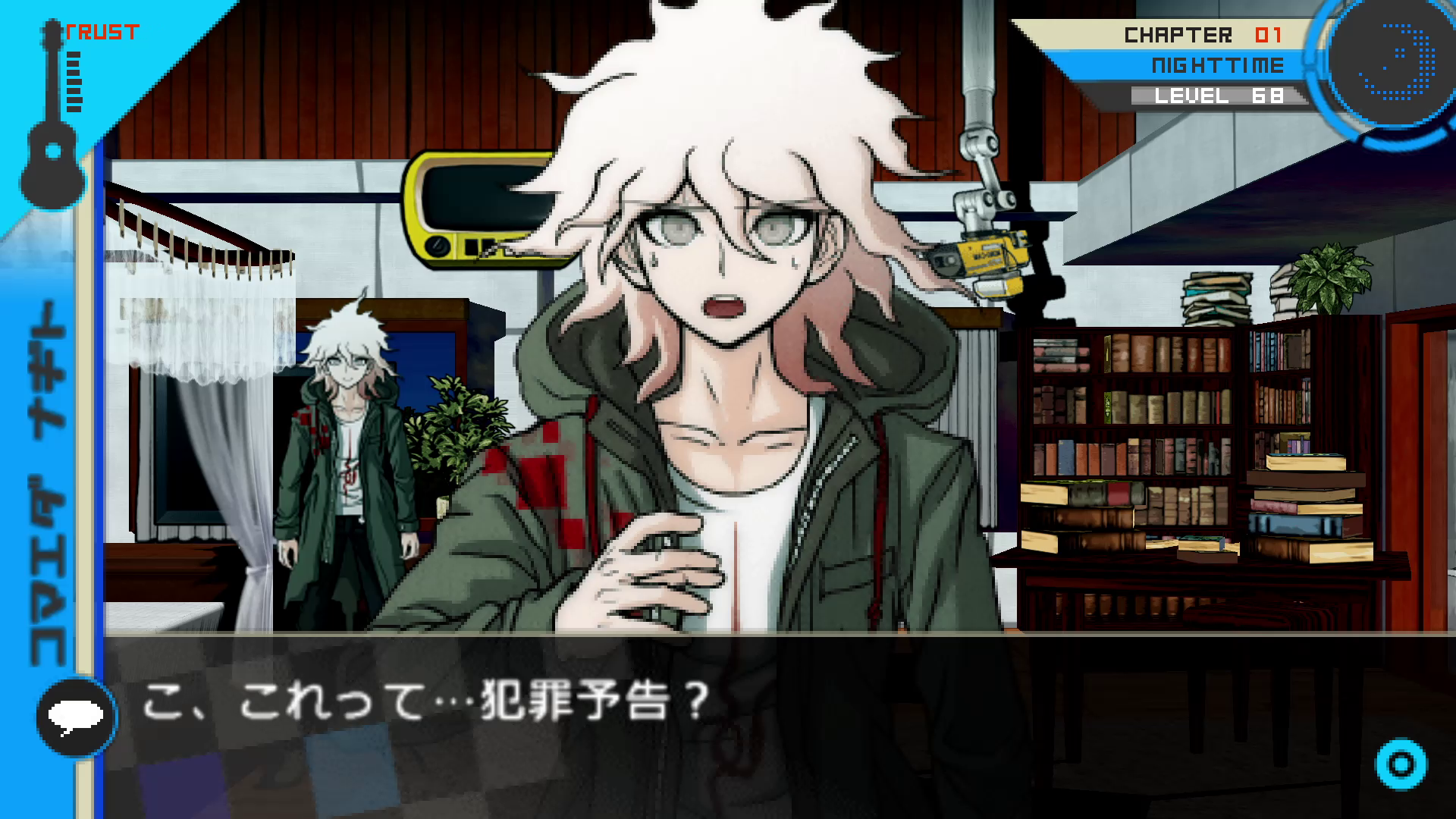
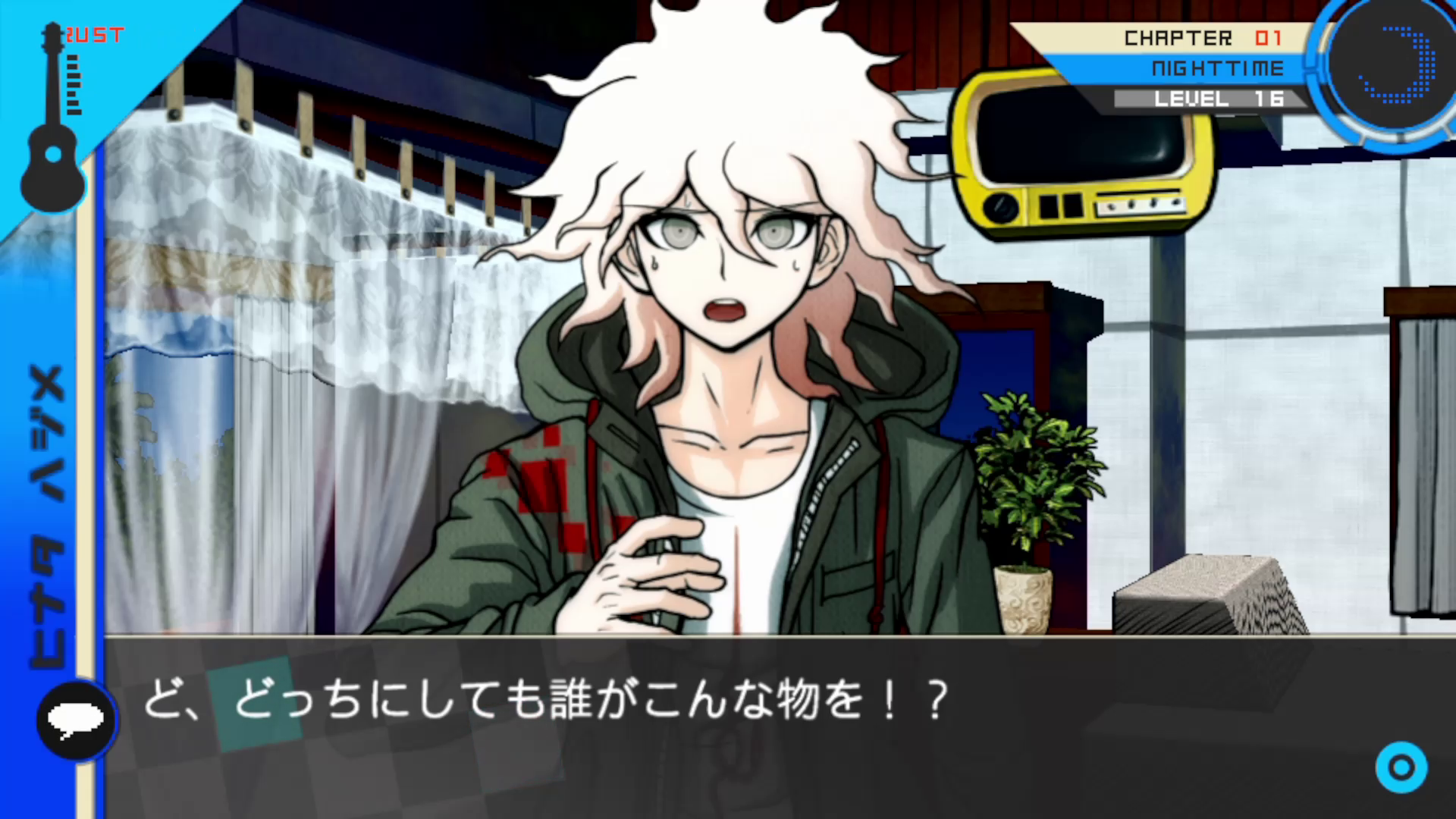
Overview: This oversight is a pretty funny one. In Chapter 1's investigation, after you inspect the threatening letter, the game has Komaeda speak to you...except, they forget to pan the camera to his full-body sprite in the back and hide it, leaving him to talk to you...while he also stands in the background. This oversight continues to persist until he leaves the cottage. It was fixed in the PSVita remake of the game and has not been seen since.
Why Does it Happen? While we can clearly observe that it was simply a mistake of forgetting to write the necessary code, we can actually fact-check this by using morgana-x's LIN compiler tool. Using this, we can view both the text and coding pertaining to all the LIN files in the Danganronpa games (the LIN files are where all the game dialogue is stored). This particular part is found in e01_100_108.LIN, with "e01" meaning "episode (aka chapter) 1", "sequence 100" (all investigations are under sequence 100), "scene 108". If we compare the coding of this file to that of the PSVita version, there is indeed added code into the PSVita version that fixes it. Below is the code from the point the picture of the letter fades to black and you re-enter the room to speak with Komaeda, with the PSVita's fixed code highlighted.
ChangeUi(UI_TEXTBOX, 0)

		        ChangeUi(UI_MINIMAL, 0)

        		SetGameState(6, 0, 0, 10)

        		ScreenFade(FADE_OUT, COL_BLACK, 24)

        		Animation(2, 251, 0, 0, 0, 0, 0, 255)

        		ChangeUi(UI_BG_BLACK, 0)

        		ChangeUi(UI_HUD, 1)

        		ChangeUi(UI_BUSTUP, 1)

        		ChangeUi(UI_CAM_SUBAREA, 0)

        		ScreenFade(FADE_IN, COL_BLACK, 24)

        		SetGameState(5, 0, 0, 20)

        		ChangeUi(UI_CAM_ZOOM, 1)

        		SetGameState(5, 0, 0, 10)

        		ChangeUi(UI_CAM_CHAR, 1)

        		SetGameState(5, 0, 0, 20)

        		ChangeUi(UI_TEXTBOX, 1)

        		Sprite(0, CHR_KOMAEDA, 13, SPRITE_SHOW, CAM_CENTER)

        		Voice(CHR_KOMAEDA, CHAPTER99, 0, 25, 100)

		        Text("こ、これって…犯罪予告?\n")
Likewise, here is the code for when Komaeda leaves the room, also with the PSVita's fix in bold.
Text("…じゃあ、また後でね。\n")

        		WaitFrame()

        		Sound(0, 201, 100)

        		Sprite(0, CHR_KOMAEDA, 0, 5, CAM_CENTER)

        		ChangeUi(UI_BUSTUP, 0)

        		Sprite(0, CHR_KOMAEDA, 98, SPRITE_3D, CAM_FARLEFT)

        		LoadSprite(0, 108, 1, 0)

        		SetGameState(6, 0, 0, 60)

        		LoadSprite(0, 108, 1, 0)

        		LoadSprite(1, 52, 9, 0)

        		LoadSprite(0, 7, 9, 1)

        		LoadSprite(1, 99, 0, 252)

        		LoadSprite(0, 7, 28, 1)

        		LoadSprite(1, 56, 28, 1)

        		WaitInput()

        		ChangeUi(UI_TEXTBOX, 0)

        		ChangeUi(UI_CAM_SUBAREA, 0)

        		SetGameState(5, 0, 0, 60)

        		ChangeUi(UI_TEXTBOX, 1)

        		Speaker(CHR_HAJIME)

        		Text("………………\n")
EDIT: I got the information in my video wrong about the game using "Hajime" internally. This is a quirk of morgana-x's script. Sorry! (Internally, Hinata is referred to as "Hinata" or simply "0").
This page is adding articles! Thank you for your patience.